Posts

Showing posts with the label Excel Tutorial

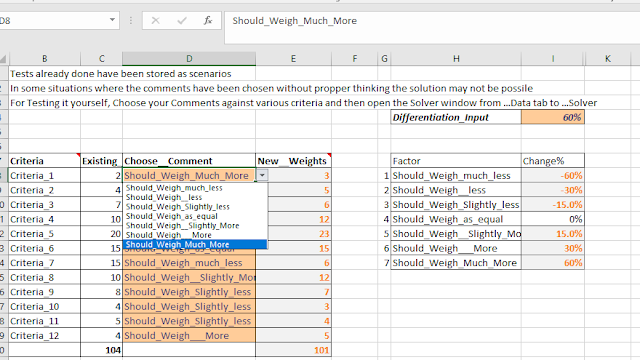
Revising Criteria weights using Excel Solver
Image
Technological and other changes are forcing organizations to quickly modify their project design requirements. For example, the successful introduction of new technologies in the construction industry would require a fundamental change in which the preliminary cost and schedule estimates are made. Changes in the weights of various inputs that go into the preliminary estimate become an immediate requirement. Design cycle improvements require training teams interactively and process inputs improvement. Project stakeholders demand improvements in the deliverables and justifications of enhancements in the first costs even if the life cycle costing of the habitat goes down. Similarly, the technique illustrated in the solution may be used in changing indicator weights as needed. (The improvements and user demand would also push the green building norms and other sustainability indicators).
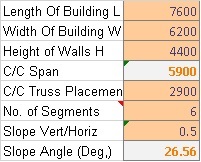
Using Excel Solver Feature to analyze and optimize the Steel Truss Design.

Image
Using Excel Solver Feature to analyze and optimize the Steel Truss Design. If you are a Structural Designer and an advanced excel user, you might have or would like to use Solver Add in in Excel to optimize various designs.This feature is a paradigm shift from one way traditional design methods. Here, you  make Excel try numerous design options/ possibilities till it meets all codal provisions for safety etc. and is also most economical. But I would like to warn the new professional that there is no substitute to getting deep into the design process and asking right questions from the professional peers and industry stakeholders. For why you should design with excel please refer to my previous blog at   http://www.ashutoshp.in/2014/01/why-design-using-excel.html

Excel Solver Primer for Construction Stakeholders

Image
Solver in Excel does what its name is. Like any other excel tool it is best learnt through an example. Let us look at stakeholder’s motives.  Builder’s motives are plain and simple profit maximization. Professional motives are a bit complex and difficult to formulate.  The Architect want space planning to meet his design vision. The Green Building Professional wants external façade to optimize daylight as well as thermal insulation. The structural and project Engineers want  the structure and construction process to be safe. The Project Management team is required to satisfy the needs of all the stakeholders.

WHY DESIGN USING EXCEL?

Why on earth would one like to do structural and other construction related designs using Excel? Are not there lot of software already? And most tend to get user friendly and simplistic after a few repetitions. The answers to above are, that is why and more so! The software in use are black boxes and don’t really connect with your conceptual engineering (first principles) knowledge. And that is why you can’t be creative or audit it. The questions that must be asked are. Can one relate the process with basics? Can you be creative and generate alternatives?   How does it handle integrated cost optimization and quantitative risk management? In any case, you require the designs to be cross checked with another software application. And the knowledge worker within you would definitely like to connect it with subject basics. It is fun to use advanced Excel skills to address the above. Building Green demands creativity and innovation. Sustainability requires energy and ...

BILLING WITH MS EXCEL (V-1)

Image
For Construction billing of buildings Many ERP Solutions Require. 1.       Tower wise data (Required). 2.      Unit wise data (Required but may be relaxed ) Additionally the best billing practices (Procedure) require the process to be: 1.        Simple & easy to work with and understand. 2.   Transparent and Electronically Audit-able. 3. The important data such as BOQ item rates and material coefficients etc. should be  tamper-proof . HOW EXCEL CAN HELP? A few of Excel tricks can make you achieve all the above and more. This tutorial shall help you to achieve the best construction billing practices which are essential for effective SAP implementation and utilization of the data for project related time and cost analysis for Project Monitoring & Control. The good news is that you need not change your computer hardware or billing engineer though faster computer would help....

Data Validation

As a default, you can fill in just any text or Number etc. in any cell of your worksheet. Databases and solutions however demand reliability.  The Data validation feature just does that. For example you might want to dictate the following rules to your electronic measurement book.