Posts

Showing posts with the label Excel Application

Why we shiver inside an old passively oriented Building?
Image
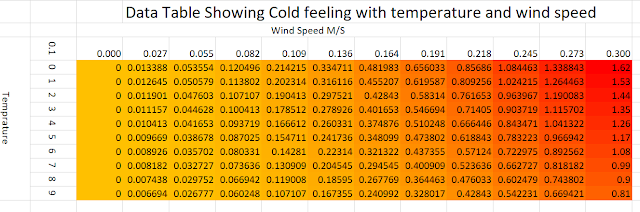
Why during winters, does it feel colder inside an old passively built habitat? And what can improve it? Yes, at present the Delhi NCR is undergoing extreme heat, the corona epidemic has forced us all to stay indoors. One is lucky to reside in a passively oriented low-rise habitat with grown-up trees. But those in high-rise apartments without passive orientation have to bear the burnt.

Construction Billing with Excel Update

Image
MS Excel has been used for construction billing from the very beginning of its launch. Excel 2007 with the introduction of Pivot tables made calculations like abstracts appear like magic. Other calculations like theoretical cement consumption etc. were also possible and yet total automation was not possible. Power Query and Power Pivot an addon to Excel 2010 were initially inaccessible have come of age now. The users of this blog would like to visit "Billing with MS Excel (V-1)" to see the possibilities of using pre-2013 Excel versions. The new data capabilities make Excel a gamechanger for billing and similar applications. Please look at the possibilities of this tutorial.

Project Scenarios-What if Analysis

Image
Project conception and monitoring involve estimation risks. Estimates are uncertain. Expert judgement is used to quantify these.  However hard we plan, there would always be some random variations. Let us explore the “what if” in the forecast group at data tab.  Scenario manager here is helpful in creating various project (probable) outcomes.   This concept is best understood using an example. Click  here  to download the workbook. You need to solve it to get a grip over it. Do the followings. Use “Goal seek” to create the various break-even quantities Use “data table” to vary two variables at a time Create a “Scenario Summary” with most likely, Optimistic and Pessimistic quantities.    Run Monte Carlo simulation. These tricks allow great possibilities to a problem solver. Your comments to simplify and further explore it are welcome.

Simple Visualization of Sun,facade, Window and Shade

Image
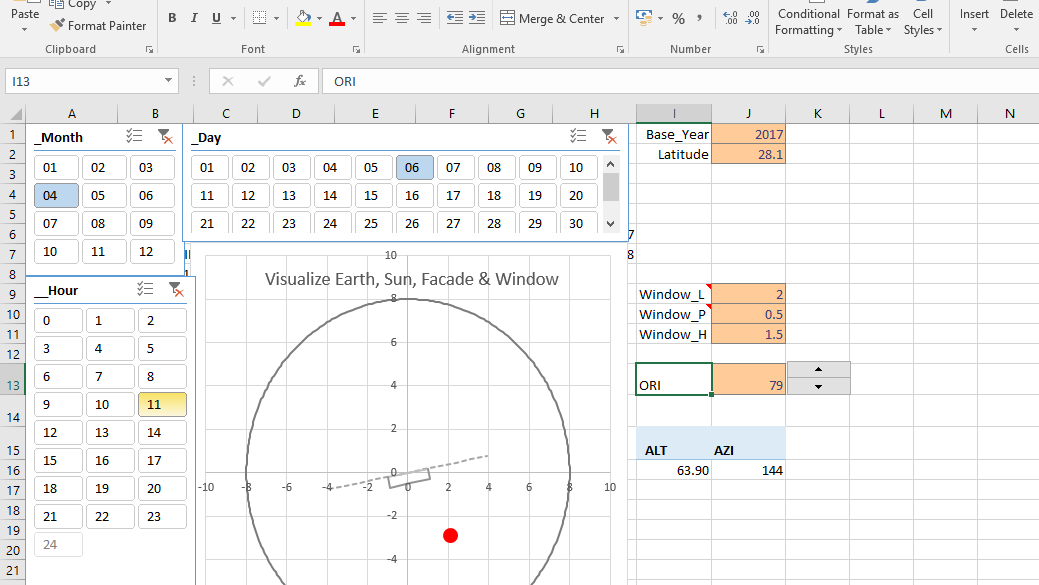
The raison d'etre of using Excel for designing/ decision making is that the solution is not a black box and professionals besides relating to basic principles can play with it through and create scenarios. Transparency of formulas and correlations when supported with basic visualizations however can authenticate decision making. Seeing is believing. Optimal solar passive design requires varying requirements.

Revising Criteria weights using Excel Solver

Image
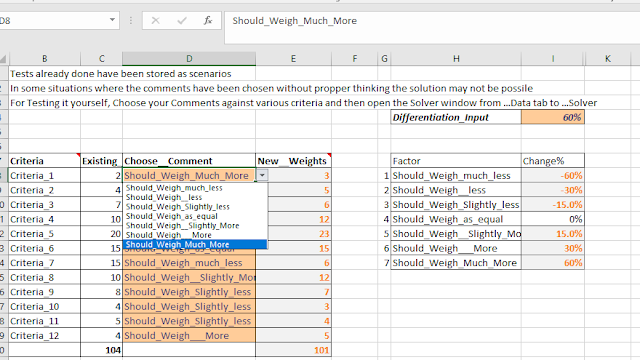
Technological and other changes are forcing organizations to quickly modify their project design requirements. For example, the successful introduction of new technologies in the construction industry would require a fundamental change in which the preliminary cost and schedule estimates are made. Changes in the weights of various inputs that go into the preliminary estimate become an immediate requirement. Design cycle improvements require training teams interactively and process inputs improvement. Project stakeholders demand improvements in the deliverables and justifications of enhancements in the first costs even if the life cycle costing of the habitat goes down. Similarly, the technique illustrated in the solution may be used in changing indicator weights as needed. (The improvements and user demand would also push the green building norms and other sustainability indicators).

Decision Making Through Life Cycle Costing- A Simple Practical Example

Decision Making Through  Life Cycle Costing- A Simple Practical Example Problem Statement: To compare the life cycle costing by calculating the single Present  Value for different scenarios. A choice is required to be made for air conditioning by Installing AC only Installing AC along with insulation works and solar film . The variables would be the Initial costs and the Cost of Capital. The link below would take you to the Excel worksheet wherein the comments in each cell would make you understand the process fully. It is assumed that the user is a knowledge worker and the input parameters have been evaluated through experts. Excel Workbook has been set in a manner that is fit for a novice excel user. Download The Excel File Related Article - THE ECONOMY OF ENERGY EFFICIENT BUILDINGS; AN INDIAN PERSPECTIVE

Application for Making Parabolic Camber Board

This Excel Application Calculates the Points for making a parabolic camber Board and draws a chart for the half road section profile. You are required to enter the road width and the % slope. The parabolic shape is given so that the profile is flat at the middle and steeper towards the edges, which is preferred by the fast moving vehicles as they have to frequently cross the crown line during overtaking operations.  on a two lane highway. Download Application here.

WHY DESIGN USING EXCEL?

Why on earth would one like to do structural and other construction related designs using Excel? Are not there lot of software already? And most tend to get user friendly and simplistic after a few repetitions. The answers to above are, that is why and more so! The software in use are black boxes and don’t really connect with your conceptual engineering (first principles) knowledge. And that is why you can’t be creative or audit it. The questions that must be asked are. Can one relate the process with basics? Can you be creative and generate alternatives?   How does it handle integrated cost optimization and quantitative risk management? In any case, you require the designs to be cross checked with another software application. And the knowledge worker within you would definitely like to connect it with subject basics. It is fun to use advanced Excel skills to address the above. Building Green demands creativity and innovation. Sustainability requires energy and ...

BILLING WITH MS EXCEL (V-1)

Image
For Construction billing of buildings Many ERP Solutions Require. 1.       Tower wise data (Required). 2.      Unit wise data (Required but may be relaxed ) Additionally the best billing practices (Procedure) require the process to be: 1.        Simple & easy to work with and understand. 2.   Transparent and Electronically Audit-able. 3. The important data such as BOQ item rates and material coefficients etc. should be  tamper-proof . HOW EXCEL CAN HELP? A few of Excel tricks can make you achieve all the above and more. This tutorial shall help you to achieve the best construction billing practices which are essential for effective SAP implementation and utilization of the data for project related time and cost analysis for Project Monitoring & Control. The good news is that you need not change your computer hardware or billing engineer though faster computer would help....

Optimizing Facade Elements with Spread Sheet Model

Image
The paper coauthored with Anagh  has been published in the proceedings of National Level Symposium (Festival of Architecture & Built Environment-10th &11th Feb. 2012) organized by SRM University, Chennai.   (ISBN: 978-81-8424-755-8 Published by Allied publishers private Limited-Chennai)   Energy Saving By Optimizing Facade Elements with  Spread Sheet Model. Abstract: A major component of energy requirements for cooling and heating  comes through facade elements of a habitat. Bulk of this huge energy requirement can be  reduced through optimum orientation and detailing of building facade elements. The  graphical methods available for calculating the energy inputs are lengthy and cumbersome. Hourly heat ingress or loss quantification over the year makes such manual methods   impractical. The popular energy software are black boxes requiring inflexible and voluminous  data entries and are not suited for optimizing ind...